
Save and Load Paint
Runtime Mesh Painting saves paint as patch history, not as a full render target image and not by replaying brush hits.
Each patch stores only the changed pixels of the painted render target. Loading writes those pixels back to the runtime targets directly, so the saved result does not depend on the actor's world transform, skeletal pose, collision, or current brush material.
Before You Start
On every RuntimeMeshPaintTargetComponent that you want to save, leave Record Paint Patch History enabled. It is enabled by default.
Create a Blueprint class derived from SaveGame. Add a variable with this type:
text
Runtime Mesh Paint Patch HistoryFor this guide, the variable is named PaintHistory.
Multiple Mesh Targets
One RuntimeMeshPaintTargetComponent can have multiple entries in its Mesh Targets array. You still need only one Runtime Mesh Paint Patch History variable for that component: export saves paint for every mesh target in that array, and import restores each patch to its matching mesh target automatically.
Use separate history variables only when your level has multiple, separate RuntimeMeshPaintTargetComponent instances. Export and import each component's history separately.
Save
At your save point, get the RuntimeMeshPaintTargetComponent and call Export Paint Patch History.
- Create or reuse your
SaveGameobject. - Call
Export Paint Patch Historyon the paint target. - Store
Out Historyin thePaintHistoryvariable on the SaveGame object. - Call Unreal's
Save Game to Slotnode.
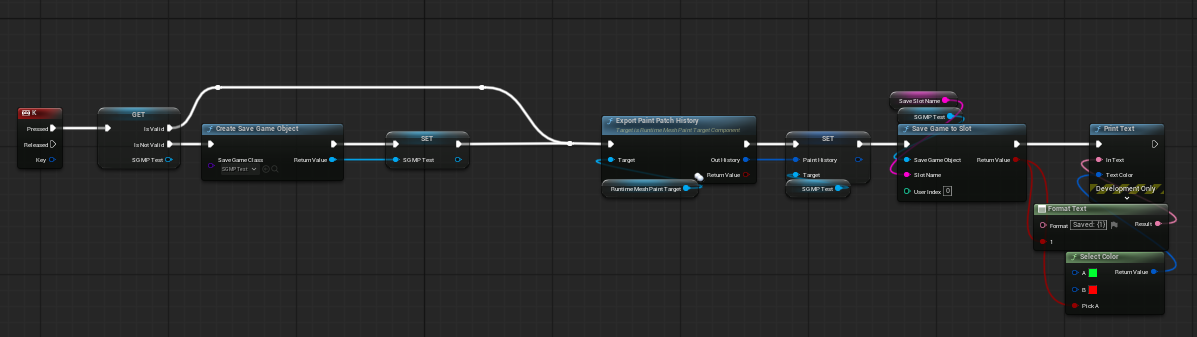
Export Paint Patch History flushes any pending patch capture before it returns. Its return value is true when there is paint history to save.
Load
Load the same SaveGame slot, cast it to your SaveGame class, then pass its PaintHistory variable into Import Paint Patch History on the matching target component.
- Call Unreal's
Load Game from Slotnode. - Cast the returned object to your SaveGame class.
- Read the saved
PaintHistoryvariable. - Call
Import Paint Patch Historyon the matchingRuntimeMeshPaintTargetComponent.

Use the default options for a normal load:
Clear Existing Paint: enabled. Clears the current runtime paint before applying the saved result.Clear History: enabled. Replaces the component's in-memory patch history with the imported history, so a later save contains the loaded result.
The return value is true when at least one saved patch was applied successfully.
What Is Saved
The history contains changed paint regions for both the painted color render target and the painted material settings render target when material settings painting is enabled.
It does not store or replay a brush hit. This keeps a loaded result stable when:
- The actor moves or rotates.
- A skeletal mesh changes pose.
- The collision setup changes.
- The brush material changes after the save was created.
History Size and Performance
Patch capture work is deferred while the player paints, so normal brush strokes do not wait for a render-target readback. The pending patches are captured when you export, compact, or explicitly flush the history.
For a complete save, keep these target component values at 0:
Max Patch History EntriesMax Patch History Bytes
A value above 0 removes the oldest patches when the limit is reached. This is useful for bounded memory, but an exported history may no longer reconstruct the entire painted result.
For large histories, call Compact Paint Patch History before saving. Store its compacted output instead of the regular export output when you want fewer, larger patch entries.
Multiplayer and Dedicated Servers
Save/load patch history is a local persistence workflow. Importing it updates the local runtime render targets; it does not replicate a save or load to other clients.
Use the existing runtime paint command replication for live multiplayer painting and late join. A dedicated server does not render paint targets, so patch-history import returns false there.
Common Mistakes
Record Paint Patch Historyis disabled, so there is no history to export.- A history is imported into the wrong
RuntimeMeshPaintTargetComponent. - Multiple target components are used, but only one history variable is saved.
- A non-zero patch history limit removed old patches before the save.
Clear Existing Paintis disabled when the intention is to replace, not layer, the saved result.