Export Painted Textures
RuntimeMeshPaintTargetComponent can export its painted runtime render targets to image files during play.
The exported image is the UV-space paint data, not a screenshot and not a bake of the material's final lit appearance. Use it for player-created artwork, external editing, debugging, or an art pipeline that consumes the painted texture data.
Output Location
Set Directory Path to an absolute or project-relative directory that your game can write to.
If it is left empty, the plugin writes files here:
text
<Project>/Saved/RuntimeMeshPainting/ExportsThe directory is created automatically. The nodes return the final written path, so store or display Out File Path when your project needs to find the file later.
Export One Render Target
Use Export Painted Render Target to File when you need one texture from one mesh target.
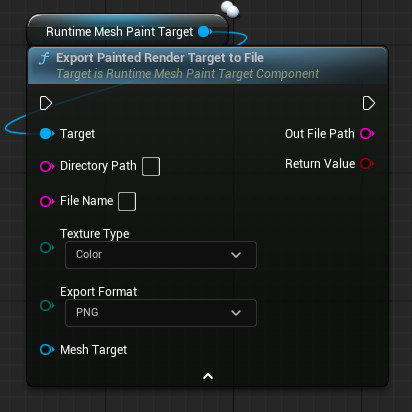
| Setting | Purpose |
|---|---|
Directory Path | Output folder. Leave empty to use the default Saved/RuntimeMeshPainting/Exports folder. |
File Name | File name without an extension. The node sanitizes it and adds the extension for the selected format. |
Texture Type | Choose Color or Material Settings. |
Export Format | Choose PNG, EXR, or HDR. |
Mesh Target | Optional. Leave empty to export the component's primary mesh target. Set it when the component owns multiple mesh targets. |
Return Value is true only after the file has been written successfully.
Export Every Mesh Target
Use Export All Painted Render Targets to Files when the component has multiple entries in its Mesh Targets array.
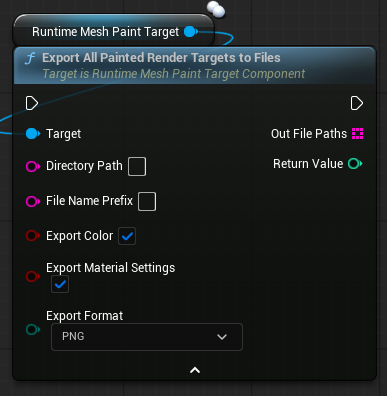
This node walks every valid mesh target on the component and can export:
Export Color: the painted color render target.Export Material Settings: the painted metallic and roughness render target, when that target exists.
Return Value is the number of files written. Out File Paths contains every successful output path.
The node creates a unique file name for each mesh and texture type using the supplied prefix, for example:
text
MyPaint_00_CharacterMesh_Color.png
MyPaint_00_CharacterMesh_MaterialSettings.png
MyPaint_01_Helmet_Color.png
Color and Material Settings
Color
Color exports the paint color render target. This is the texture normally supplied to the material function's painted color parameter.
Material Settings
Material Settings exports the additional render target created by Create Painted Material Settings Render Target on the paint target component.
Its channels are data, not a final color image:
R: metallicG: roughness
If material settings painting is disabled or that render target has not been created, there is nothing to export for this texture type.
Format Choice
| Format | Recommended use |
|---|---|
PNG | Standard 8-bit image output for quick inspection, sharing, or common texture workflows. |
EXR | High-dynamic-range / float-capable pipeline output. |
HDR | HDR image workflow output. |
Use the same format for all files from one export batch when the files will be processed together.
Multiple Mesh Targets
For a component with multiple Mesh Targets:
- Use the single-export node with
Mesh Targetset when you need only one mesh. - Use the all-export node to export all targets in one call.
Each mesh target has its own runtime render targets, so each exported file contains only that mesh target's paint data.
Save/Load vs Export
Use this export system when you need actual image files outside the game. Do not use exported PNG, EXR, or HDR files as the normal persistence path for runtime paint.
For SaveGame persistence, use Save / Load Paint. It stores patch history and restores paint directly to the runtime targets without importing image files.
Limitations
- Export writes files locally on the machine running the render target.
- Dedicated servers do not render paint targets, so export returns
falseor0there. - Export does not send files to clients or upload them anywhere.
- The output folder must be writable by the packaged game.