Multiplayer
Runtime Mesh Painting replicates paint commands, not render target textures.
Each client receives the accepted paint commands and applies them locally through the same GPU paint path. This keeps bandwidth low and also lets late-joining players rebuild the painted state from history.
Multiplayer Quick Start
1. Set Up the Paintable Mesh
Set up the mesh the same way as the normal Quick Start:
- Add
RuntimeMeshPaintTargetComponentto the mesh actor. - Set up the mesh material with the
Mesh Paintingmaterial function. - Make sure the mesh blocks the painting trace channel, usually
Visibility. - Make sure the material
UV Indexmatches the target componentUVChannel.
2. Enable Runtime Paint Replication
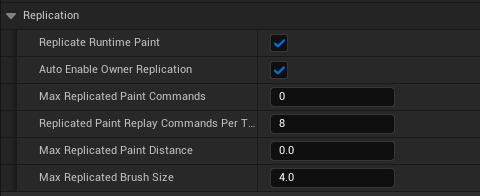
On RuntimeMeshPaintTargetComponent, keep Replicate Runtime Paint enabled.
The default values are enough for a first multiplayer test:
Replicate Runtime Paintenables command replication for this paint target.Auto Enable Owner Replicationallows the component to enable replication on the owner actor at runtime.Max Replicated Paint Commands = 0keeps the full command history, which is the safest setting for late join.Replicated Paint Replay Commands Per Tickcontrols how many stored commands a joining client replays per tick.Max Replicated Paint Distance = 0disables distance validation.Max Replicated Brush Sizelimits the largest brush size accepted by the server.
3. Make Sure the Target Actor Replicates
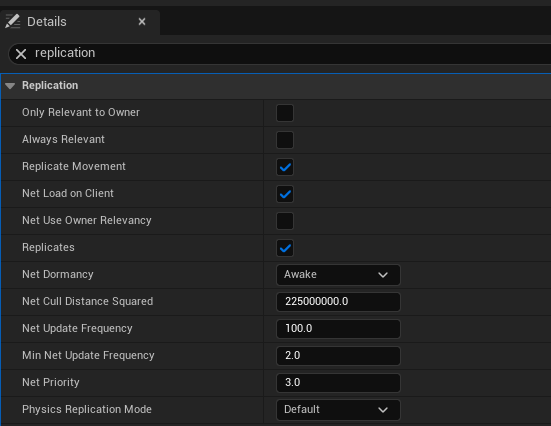
The actor that owns the paint target should replicate. Auto Enable Owner Replication can handle this on authority, but it is still a good idea to verify the actor's replication settings while setting up the level.
4. Add the Painting Controller
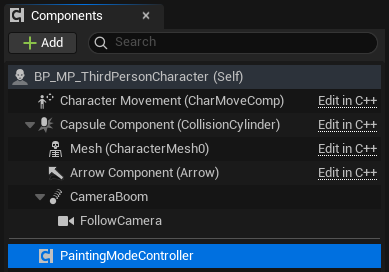
Add PaintingModeControllerComponent to the player pawn, character, or player-owned controller that handles painting input.
This is important because client-to-server paint RPCs must come from an owned actor/component. The paint target in the world may not be owned by the painting client, so the controller component is the correct entry point for multiplayer painting.
5. Optional: Limit Which Targets the Controller Can Paint
You do not need to assign a target filter for a basic multiplayer test.
If no filter is configured, the controller can paint any valid RuntimeMeshPaintTargetComponent it hits.
If you want to limit painting to specific targets, set it from Blueprint or C++ using the controller functions such as SetPaintTargetComponent, SetPaintTargetComponents, or AddPaintTargetComponent.
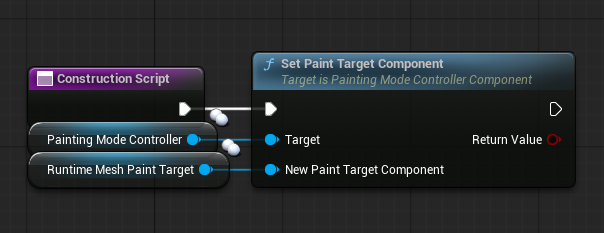
6. Test With Two Players
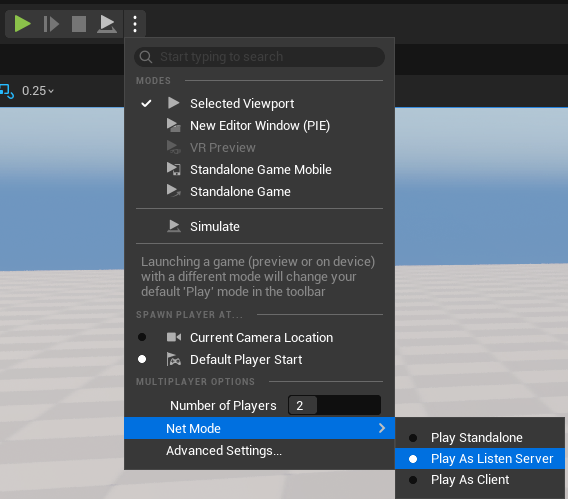
In Play settings, start with two players and use a listen server setup for a simple local test.
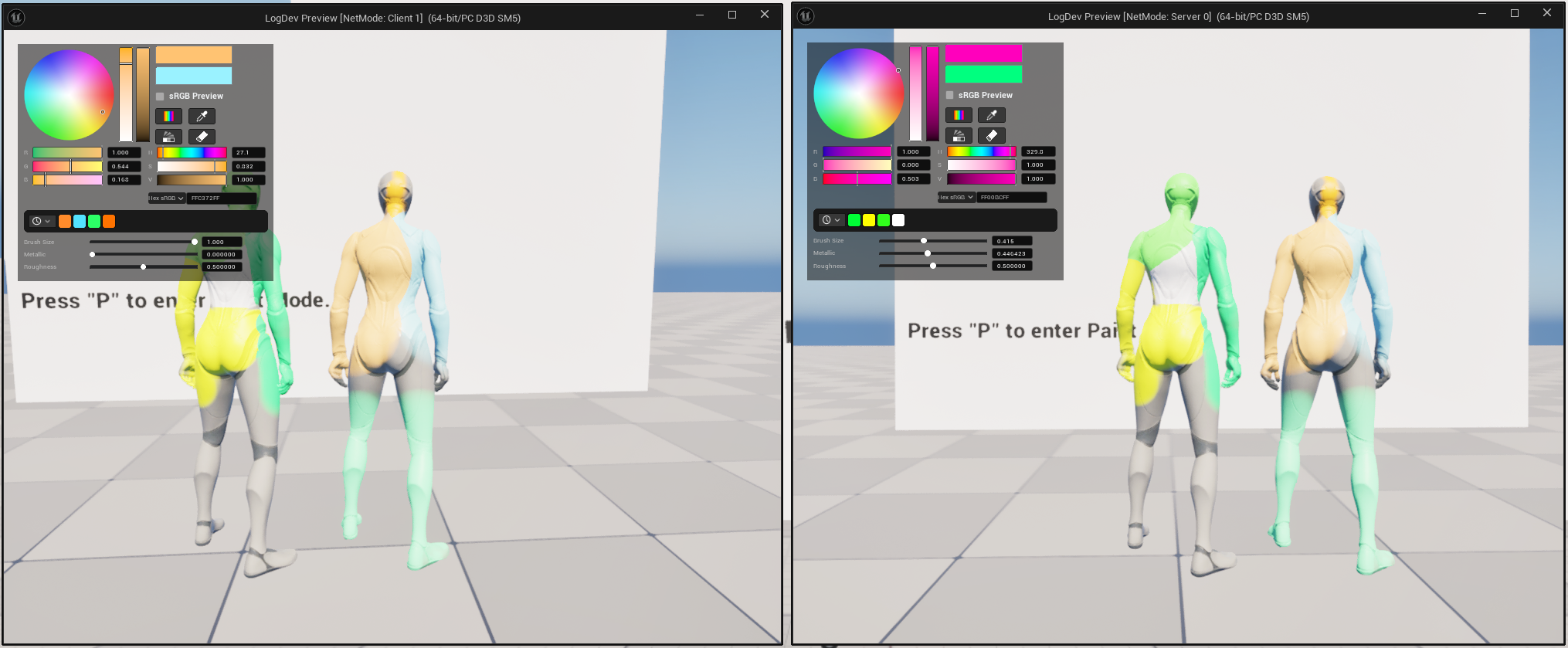
Paint from one player and confirm that the same paint appears for the other player.
7. Test Late Join
After live replication works, test a player joining after paint already exists.
For late join to work correctly, keep Max Replicated Paint Commands at 0 unless you have your own checkpoint or save system. A value of 0 keeps the full command history so a new client can rebuild the current paint state.
How It Works
Command Replication
The plugin does not send render target pixels over the network.
Instead, every accepted paint action is stored as a compact command containing the target, mesh target index, UV channel, stroke id, brush ray, brush center, brush normal, brush size, color, material settings, erase flag, and optional screen projection data.
Skeletal mesh paint commands include screen projection data. This lets every client reproduce the same GPU projected brush result without relying on per-poly collision, FindCollisionUV, or the old CPU skeletal UV fallback path.
Local Prediction
When a local player paints, the controller applies the paint immediately on that client for responsive feedback.
The same command is then sent to the server. When the server accepts it, other clients receive and apply the command locally. The original painting client skips duplicate application of its own predicted command.
Changing color, metallic, roughness, brush size, or eraser state only updates local brush settings. A history entry is created only when an actual paint command is applied.
Server Validation
The server validates incoming commands before adding them to history.
Validation checks include:
- Runtime paint replication is enabled.
- The command targets the correct component.
- The command uses the same
UVChannelas the target component. - The mesh target index is valid.
- The brush size is within
Max Replicated Brush Size. - The brush ray and normal are valid.
- Skeletal mesh commands include valid screen projection data.
- Optional distance validation passes when
Max Replicated Paint Distanceis greater than0.
Late Join Replay
Late-joining clients initialize their local runtime render targets, receive the replicated command history, and replay the commands over multiple ticks.
Replicated Paint Replay Commands Per Tick controls how quickly the history is replayed. Higher values catch up faster, while lower values reduce hitch risk when the history is large.
Replicated commands are queued by CommandId before replay. If a command cannot be applied yet because the local runtime target is not ready, replay pauses instead of dropping the command.
Dedicated Server Behavior
Dedicated servers do not render paint textures.
They only receive paint commands, validate them, assign command ids, store the authoritative command history, and replicate that history to clients. The visible paint result is generated on clients and listen-server hosts.
Common Mistakes
- The paint target actor does not replicate.
Replicate Runtime Paintis disabled on the target component.Max Replicated Paint Commandsis set to a small value, then late join cannot rebuild older paint.- The material
UV Indexand target componentUVChanneldo not match. - The mesh does not block the painting trace channel.
- The painting controller is not on a player-owned actor/component.