RuntimeMeshPaintTargetComponent
RuntimeMeshPaintTargetComponent is the component that makes an actor paintable.
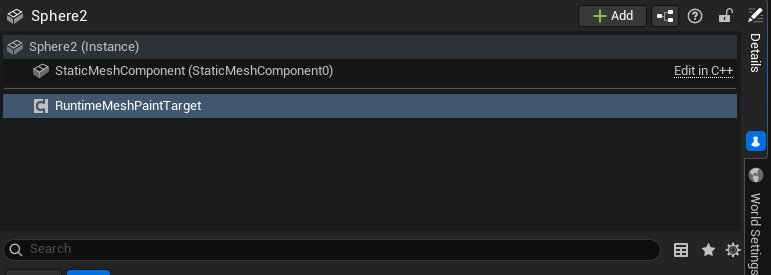
Add it to the actor that owns the mesh you want to paint. At runtime, the component creates the paint render targets, binds them to the mesh material, resolves paint hits, and applies paint through the GPU painting path.
What It Does
The paint target component is responsible for the mesh-side part of the system:
- Finds the mesh component that should receive paint.
- Creates the runtime color render target.
- Optionally creates the material settings render target.
- Creates the brush preview mask render target.
- Assigns those render targets to dynamic material instances.
- Resolves hit data into UV and surface data.
- Applies paint commands locally.
- Stores replicated paint command history when multiplayer paint replication is enabled.
Required Setup
For a basic paintable mesh, you usually only need:
- A mesh actor in the level.
RuntimeMeshPaintTargetComponenton that actor.- A material using the
Mesh Paintingmaterial function. - Collision that blocks the painting trace channel, usually
Visibility.
The default render target settings are enough for a first test.
Runtime Target Settings
The Runtime Target section controls the render targets and material texture bindings used by the component.
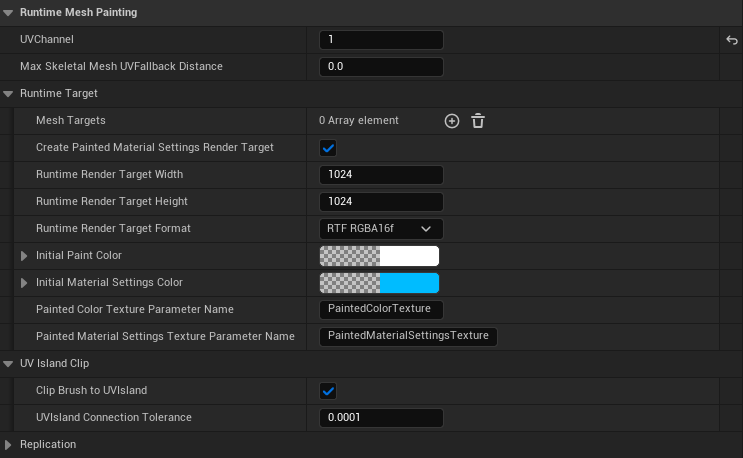
| Setting | Purpose |
|---|---|
Mesh Targets | Optional list of named mesh components that can be painted. |
Create Painted Material Settings Render Target | Creates the extra render target used for painted metallic and roughness data. |
Runtime Render Target Width | Width of the runtime paint texture. |
Runtime Render Target Height | Height of the runtime paint texture. |
Runtime Render Target Format | Texture format used by the runtime render targets. |
Initial Paint Color | Starting clear color for the color paint target. |
Initial Material Settings Color | Starting clear color for the material settings target. |
Painted Color Texture Parameter Name | Material texture parameter that receives the color paint target. |
Painted Material Settings Texture Parameter Name | Material texture parameter that receives the material settings target. |
Brush Preview Mask Texture Parameter Name | Material texture parameter that receives the GPU brush preview mask. |
In most cases, keep the texture parameter names at their defaults and set up the material through the plugin's Mesh Painting material function.
The default parameter names expected by the plugin material function are:
| Parameter | Purpose |
|---|---|
PaintedColorTexture | Runtime base color paint texture. |
PaintedMaterialSettingsTexture | Runtime metallic/roughness paint texture. |
BrushPreviewMaskTexture | Runtime brush preview ring mask. |
Mesh Targets
If the actor has a single mesh component, the paint target can resolve it automatically.
If the actor has multiple mesh components, use Mesh Targets to choose exactly which components should receive paint. The values are component names, such as StaticMeshComponent0.

If the list contains multiple valid meshes, the component creates runtime paint data for each selected mesh.
UV Channel
UVChannel decides which UV channel is used for hit UV calculation and GPU paint projection.
This must match the UV Index used by the Mesh Painting material function. If these values do not match, paint can appear offset, stretched, or on the wrong part of the mesh.
Max Skeletal Mesh UV Fallback Distance
Max Skeletal Mesh UVFallback Distance is only used by skeletal mesh UV fallback resolution.
0.0disables the distance limit.- A value greater than
0.0rejects fallback results if the resolved triangle is farther than that distance from the hit point.
This does not control brush size or preview size.
The current GPU projected painting path avoids using skeletal fallback during the normal brush hot path. Keep this setting at its default unless you are calling lower-level hit resolving functions that explicitly need fallback behavior.
UV Island Clip
Clip Brush to UVIsland keeps large brushes from painting unrelated UV islands when the brush overlaps seams in UV space.
Keep it enabled for most meshes, especially:
- Characters with many UV islands.
- Cubes or hard-surface meshes with separated UV faces.
- Large brush sizes.
- Visible seam areas.
UVIsland Connection Tolerance controls how close UV edges need to be before they are treated as connected. The default is usually correct; only change it if your mesh has unusual UV precision issues.
Replication Settings
The replication settings are used when the paint target should work in multiplayer.
| Setting | Purpose |
|---|---|
Replicate Runtime Paint | Enables replicated paint commands for this target. |
Auto Enable Owner Replication | Lets the component enable replication on the owner actor on authority. |
Max Replicated Paint Commands | Limits stored paint history. 0 keeps full history for late join. |
Replicated Paint Replay Commands Per Tick | Controls how many stored commands are replayed each tick on clients. |
Max Replicated Paint Distance | Optional server validation distance. 0 disables this limit. |
Max Replicated Brush Size | Maximum brush size accepted by the server. |
For more details, see Multiplayer.
Patch History Settings
Patch history powers the local Save / Load Paint workflow. It records the changed render-target pixels after a paint operation, rather than saving a full render target or replaying brush hits.
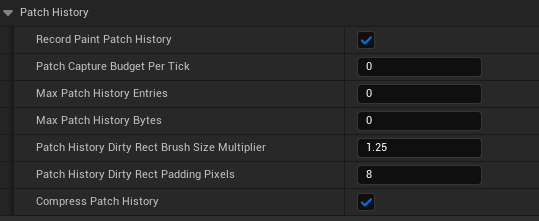
| Setting | Purpose |
|---|---|
Record Paint Patch History | Enables patch-history tracking. Keep this enabled when the target must support Save/Load. Disabling it also skips dirty-rect calculation and patch capture bookkeeping. |
Max Patch History Entries | Maximum stored patch count. 0 keeps every patch. A non-zero limit removes the oldest patches and can make a later save incomplete. |
Max Patch History Bytes | Maximum memory used by stored patch data. 0 disables byte-based trimming. As with the entry limit, trimming old patches prevents a complete reconstruction. |
Patch History Dirty Rect Brush Size Multiplier | Safety multiplier used when calculating the changed texture region. Leave the default 1.25 unless you have verified that a different brush setup still captures every changed pixel. |
Patch History Dirty Rect Padding Pixels | Extra texture pixels added around the changed region. Leave the default 8; reducing it can cut off soft brush edges. |
Compress Patch History | Compresses stored pixel data to reduce runtime memory and SaveGame size. Keep this enabled unless profiling shows a specific reason not to. |
Patch capture is intentionally deferred while a player paints. This avoids synchronous render-target readback during a brush stroke. Export Paint Patch History and Compact Paint Patch History flush pending patches before they return.
For a complete save, leave both history limits at 0 and keep compression enabled. One target component records history for all entries in its Mesh Targets array.
Events
The component exposes paint-specific Blueprint events in the Runtime Mesh Painting | Events category. Unreal also shows the standard Actor Component activation events in the same Details panel.
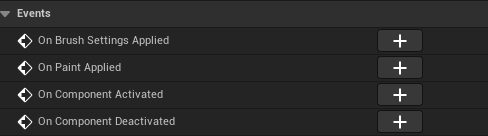
| Event | When It Fires | Typical Use |
|---|---|---|
OnBrushSettingsApplied | After ApplyBrushMaterialSettings stores and clamps the new brush material settings on this target. | React when another system applies color, opacity, metallic, roughness, or erase settings directly to the target. |
OnPaintApplied | After a paint command is successfully applied to this target. This also fires when replicated paint commands are replayed locally. | Mark the mesh as dirty, update save state, trigger small effects, or refresh UI that depends on the latest painted result. |
OnComponentActivated | Inherited Unreal component event fired when the component is activated. | Use only for normal component activation logic, not for detecting a paint stroke. |
OnComponentDeactivated | Inherited Unreal component event fired when the component is deactivated. | Use only for normal component deactivation logic, not for paint completion. |
Use OnPaintApplied when you need to know that actual painting happened. Changing brush color or settings by itself should not be treated as a paint event.
Useful Blueprint Functions
| Function | Use |
|---|---|
InitializeRuntimePaintTarget | Creates runtime render targets and applies them to target materials. Usually called automatically at runtime. |
SetTargetMesh | Sets a single mesh component as the paint target. |
SetMeshTargets | Sets multiple mesh components as paint targets. |
AddMeshTarget | Adds one mesh component to the target list. |
ClearMeshTargets | Clears the configured mesh target list. |
PaintAtHitWithSettings | Applies paint from an existing hit result and brush settings. |
PaintUnderCursorWithSettings | Finds a paint hit under the cursor and applies paint. |
SamplePaintedSurfaceColor | Samples the painted color under a hit result for color picking. |
Common Mistakes
- The actor has multiple mesh components but
Mesh Targetsis empty or points to the wrong component name. - The material does not use the
Mesh Paintingmaterial function. - The material
UV Indexdoes not matchUVChannel. - The mesh does not block the painting trace channel.
Clip Brush to UVIslandis disabled and large brushes paint across unrelated UV islands.- Multiplayer is expected to work, but the target actor or runtime paint replication is disabled.